What’s new with MyMcDonald’s Rewards?
We’ve given MyMcDonald’s Rewards a bit of a refresh.
And as part of the latest update, we will be changing how long your points are valid for. From 30th December 2025, all points will expire 6 full calendar months after they’re earned, instead of the current 12 months.
This will apply to existing and future points, meaning any points earned before 30th June 2025 will automatically expire on 1st January 2026, unless you redeem them by then!
We have also partnered with Snapchat, giving customers the chance to now redeem McDonalds rewards points on one month of Snapchat+. Find out more here
What is MyMcDonald’s Rewards?
MyMcDonald’s Rewards is McDonald’s UK customer loyalty scheme, exclusively available with the McDonald’s app. With MyMcDonald’s Rewards you earn 1 point for every penny you spend on our menu items at participating restaurants and can unlock free rewards. Alternatively, if you don’t fancy one of our food or drink products as a reward, you can even donate the value of your rewards points to one of our partner charities.
Learn more about the program (and which restaurants are currently participating) on this MyMcDonald’s Rewards page and download the McDonald’s app.
How can I join MyMcDonald’s Rewards?
In order to join MyMcDonald’s Rewards download, register and sign into the McDonald’s app on the App Store or Google Play Store. Once registered you will be offered the option to opt-in to MyMcDonald’s Rewards.
Once you have accepted our MyMcDonald's Rewards terms and conditions you are ready to earn points and redeem rewards.
How do I earn MyMcDonald’s Rewards points?
Download, register and sign into the McDonald’s app and make sure you have opted into MyMcDonald’s Rewards.
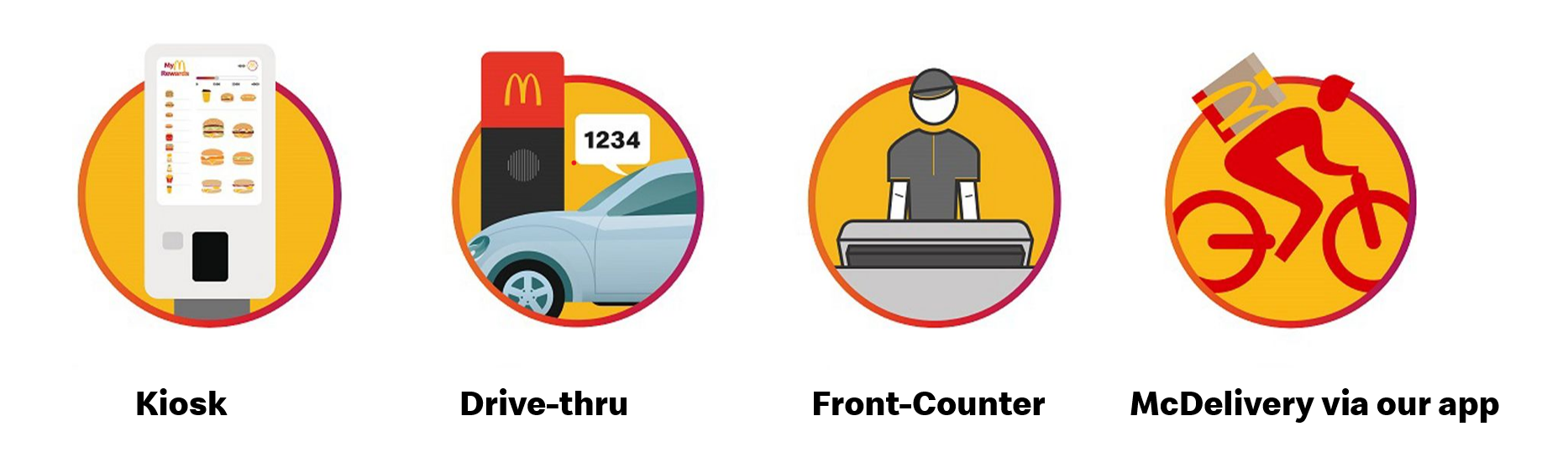
Earning points is easy! You will earn 1 point for every penny you spend on our menu items when you order using the McDonald's app at participating restaurants. That includes through the Kiosk, Drive-thru, McDelivery® via our app and the front counter. The more points you have the better the Rewards!
Learn more on the MyMcDonald’s Rewards page and download the McDonald’s app on the App Store or Google Play Store.
How do I earn points if I order at the Kiosk, Drive-thru or Front Counter?
Simply open the McDonald’s app, access your one-time-code in the ‘Code’ section of your McDonald’s app and give your one-time code at Kiosk, Drive-thru or Front Counter in a participating restaurant before completing your order! Don’t worry if you don’t see your points straight away - it can take up to 30 minutes for them to show up after you place your order.
How Much Are Points Worth?
For every penny you spend on eligible products at a participating restaurant, you will receive 1 point. You can start redeeming your MyMcDonald's Rewards when you have 2000 points. Points add up fast and you can earn even more if you look out for bonus offers to boost your balance. To see what you can redeem for your points, take a look at our reward tiers.
What rewards can I use my points for?
Once you reach 2,000 points you can redeem your first reward!
2000 Points
At 2000 points, you can get a Medium carbonated Soft Drink, Regular Tea, Americano, or Single/Double Espresso, Mini McFlurry®, Hash Brown, Small Fries, Side Salad, or donate £2 to one of our partner charities. What will you redeem your points on?
3500 Points
For 3500 points, take your pick between a Regular Flat White, Hot Chocolate, Latte, or Cappuccino, McCafé® X Sprite® Zero, Cheeseburger, Medium Fries, Mayo Chicken, Cheesy Bacon Flatbread, an Apple Pie, Regular McFlurry®, 4 Chicken McNuggets®, or donate £3.50 to one of our partner charities!
5000 Points
Or why not save up your points for a 6 Chicken McNuggets®, Double Cheeseburger, Sausage & Egg McMuffin®, McChicken® Sandwich, Filet-O-Fish®, Mac and Cheese Triangles, Chicken Salad, Medium Milkshake or donate £5.00 to one of our partner charities.
6500 Points
For 6500 points, you can get a McCrispy®, Big Mac®, Double Sausage & Egg McMuffin®, 9 Chicken McNuggets®, McPlant®, Double Filet-O-Fish®, or donate £6.50 to one our partner charities.
Visit the Rewards & Offers section on the McDonald’s app to choose your reward.
How Do I Redeem Points for Rewards?
If you have enough points for a reward, the reward will be unlocked in the Rewards Menu. You can redeem your reward at a participating restaurant at the Kiosk, Drive-thru, Front-Counter, McDelivery® via the McDonald's app or orders made on your McDonald's app.
How can I earn points and redeem rewards at the Kiosk?
Earning points and redeeming rewards with MyMcDonald’s Rewards is easy. To earn points, simply go to the ‘Code’ section on the bottom right of your McDonald’s app and enter your one-time code at the kiosk in a participating restaurant before completing your order.
If you would like to redeem a reward, simply log into a digital kiosk in a participating restaurant using your McDonald's app and select your reward from the Rewards Menu on the kiosk and complete your order. Alternatively, you can select your chosen reward on the McDonald’s app and choose ‘Add to your code’ and enter this code on the kiosk to redeem your reward.
How can I earn points and redeem rewards at the Drive-thru?
Please ensure you are safely parked with your engine switched off before opening and using the McDonald's app.
Earning points and redeeming rewards with MyMcDonald’s Rewards is easy. To earn points, simply go to the ‘Code’ section on the bottom right of your McDonald’s app and tell our crew member your one-time code during your order at the Drive-thru at a participating restaurant.
If you would like to redeem a reward, select your reward from the Rewards Menu in the McDonald’s app and choose ‘Add to your code’ and tell our crew member your one-time code during your order at the Drive-thru at a participating restaurant.
How can I earn points and redeem rewards at the Front-Counter?
Earning points and redeeming rewards with MyMcDonald’s Rewards is easy. Simply go to the ‘Code’ section on the bottom right of your McDonald’s app and tell our crew member this one-time code during your order at a participating restaurant, to earn points.
If you would like to redeem a reward, select your reward from the Rewards Menu in the McDonald’s app, choose ‘Add to your code’ and tell our crew member this one-time code before completing your order at a participating restaurant.
How can I earn points and redeem rewards when I order on the McDonald’s app?
You are automatically earning points when you place an order at a participating restaurant, using your McDonald’s app. Although points cannot be earned on any spend on bag tax, fees incurred on delivery (such as service, small order and delivery fees), tips for delivery drivers or riders, charitable donations, loading money on a gift card and purchase of gift certificates and gift vouchers.
If you would like to redeem a reward, head to the Rewards and Offers section of the McDonald’s app. Then simply select your reward from the Rewards Menu and press ‘Add to mobile order’ (for pickup orders) or ‘Add to McDelivery® order’ (for delivery orders using our app) before placing your order at a participating restaurant.
Can I Redeem a Reward and Earn Points in the Same Order?
Yes! You will still earn 1 point for every penny you spend on menu items even if you’re redeeming a reward in the same transaction. If you’re ordering via Kiosk, Front Counter or Drive-thru at a participating restaurant, you need to let us know your 4-digit code, which can be found in the ‘Code’ section of the McDonald’s app!
Check here to understand how you can earn points and redeem rewards at the Kiosk, Drive-thru, Front Counter, McDelivery® via the McDonald's app or mobile orders made on your McDonald's app at participating restaurants.
Is there a limit on how many points I can earn?
At any one time your MyMcDonald's Rewards points balance must not exceed 100,000 points.
MyMcDonald's Rewards points can only be collected on the first 10 transactions you make each day, up to 40 transactions per week. If you make more than 10 transactions in a day or more than 40 transactions in a week, MyMcDonald's Rewards points will not be collected on those transactions.
What If I Forgot to Provide My Code?
Unfortunately, you need to use your code when ordering via Drive-thru, Kiosk or Front Counter at a participating restaurant. But don’t worry, you can earn on your next order with us when using your Rewards account at a participating restaurant.
I Just Made a Purchase and My Points Aren’t There—Can You Help?
We’d be glad to help you. Make sure you used your one-time code when ordering via Drive-thru, Kiosk or Front Counter at a participating restaurant. If you have not used your McDonald’s app or your code during your order you unfortunately won’t be able to have points added to your account retrospectively.
Points will normally appear instantly on the rewards page of the app, however in rare cases it could take up to 48 hours for points to appear - please wait 48 hours from making your purchase before contacting us, as we cannot investigate any missing points claims until that 48 hour period expires.
If after 48 hours you still don’t have points, here are the steps for you to contact us in the app:
- Select More at the bottom of the McDonald's app screen
- Choose Customer Service
- Use the Virtual Assistant located at the bottom right of the page
- Select MyMcDonald's Rewards
- Enter your comments regarding your order, including your order number, order total value, and if there’s any reason you think you might be missing points.
Please do contact us within 30 days of your purchase as we are not able to investigate any missing points claims after that time.
What parts of my order can I earn points on?
You can earn points on your spend on food & drink items ordered at participating restaurants using the McDonald’s app provided that you identify your MyMcDonald’s Rewards account before you complete your purchase. You currently can’t earn points on bag tax, fees incurred on delivery (such as service, small order and delivery fees), tips for delivery drivers or riders, charitable donations, loading money on a gift card, purchase of gift certificates and gift vouchers or orders made via third party delivery services (such as Just Eat, Uber Eats).
Can I earn points on McDelivery®?
Yes, you can earn points on McDelivery® but only if you order via the McDonald's app from a participating restaurant. Please note that fees apply to delivery orders.
Unfortunately, you can’t earn points when ordering from third party delivery services.
How can I verify my MyMcDonald’s Rewards points balance?
You can check your points balance on the top right of the Rewards & Offers section in your McDonald’s app.
What is a Bonus campaign?
From time to time, McDonald’s will, at its own discretion, offer Bonus campaigns where you can earn extra points on specific items or orders at participating restaurants.
Can the Rewards Menu change?
Yes, it can change. Keep a look out on the rewards page of your McDonald’s app.
Do points expire?
Everything good has to come to an end. Each point is valid from the date on which it is earned for 6 full calendar months + the first day of the following month. For example, if you earn points on 4th January 2026, you can redeem those points until 23:59 on 1st August 2026. You can check your points balance and corresponding expiry dates in the ‘View History’ tab in the Rewards & Offers section of the app.
I Lost My Phone! Did I Lose My Points?
We’re sorry about your phone! Contact your service provider and once you have a new phone your MyMcDonald's Rewards should still be waiting for you when you log in to our app.
Where Are the Terms and Conditions?
You can access MyMcDonald's Rewards Terms and Conditions by visiting the MyMcDonald's Rewards Terms and Conditions Page.
Where can I find participating restaurants?
You can find a restaurant near you participating in MyMcDonald’s Rewards using our restaurant locator which is available here.
How do I donate the value of my points to charity?
First, go to the ‘Rewards & Offers’ section on the McDonald’s app and choose from the Rewards Menu which one of our charity partners you’d like to donate your points value to – the equivalent value of points for donation purposes is £2 for 2000 points, £3.50 for 3500 points, £5 for 5000 points and £6.50 for 6500 points!
We may change or add partner charities from time to time. Our current charity partners are Ronald McDonald House (UK) and Felix.
Next tap ‘Add to bag’. Then just follow the normal checkout process to finalise the donation. Gift aid can’t be claimed on donations of points value.